
Smart Card Reader SDK and Software Integration
How your application talks to an ACS smart card reader — and how BSD Infotech helps you get there.
A smart card reader is only useful once your software can talk to it. This page explains how that communication works — the PC/SC interface, CCID drivers, SDK tools and sample code — which ACS readers we supply support it, and what to check when a reader and an application do not work together. BSD Infotech supplies ACS readers and combines them with software, integration and custom application development around your process.
Talk to a Smart Card Expert
Tell us which card you use, which reader you have (or are choosing) and what your application needs to do. We will help you confirm reader, driver and SDK fit before you build.
What a Smart Card Reader SDK Contains
A smart card reader SDK (software development kit) is the set of drivers, tools, sample code and documentation a developer uses to make an application read and write cards through a reader. The ACS development kits documented on this page have followed a consistent pattern.
Drivers
PC/SC drivers for the reader, so the operating system can see it. CCID-compliant readers can also use the operating system’s standard CCID driver.
Tools and utilities
Utilities to check driver installation, send commands to cards, and learn the PC/SC API step by step.
Sample code
Code that demonstrates the basic commands used to communicate with the reader and the cards — a starting point for your own application.
Demo programs
Ready-made demos showing typical uses, such as e-purse, logical access control, and time and attendance.
Reference manuals
Reader and card reference manuals and technical specifications, including the command set your application will use.
Hardware and test cards
The legacy kits bundled readers and sample cards — for example ACOS3 microprocessor cards, MIFARE cards or SLE memory cards — so development could start immediately.
How Software Communicates with a Smart Card Reader
Your application does not talk to the card directly. It sends commands through a standard interface to the reader, which passes them to the card and returns the card’s response.
The application calls PC/SC
The application uses the PC/SC interface to find the connected reader and establish a connection when a card is present.
The driver handles the reader
A PC/SC driver — or, for CCID-compliant readers, the standard CCID driver — carries the request over USB to the reader.
The reader talks to the card
The reader powers the card and exchanges data with it over the contact (ISO 7816) or contactless (for example ISO 14443) interface.
Commands and responses
The application sends card commands and receives the card’s responses. For microprocessor cards these are command–response pairs (APDUs) defined by ISO 7816-4 and by the card’s own reference manual.
Why this matters: because the application is written against PC/SC rather than a single reader model, the same application logic can often work with more than one PC/SC-compliant reader. Card-specific commands, however, still depend on the card you use — so the card’s reference manual matters as much as the reader’s.
PC/SC, CCID and CT-API Explained
PC/SC
PC/SC is the standard interface between applications and smart card readers on a computer. Every ACS reader listed on this page with PC/SC compliance can be used by PC/SC-based applications, and ACS’s own development tools — such as the Card Tool — send commands to any PC/SC-compliant reader.
USB CCID
CCID is the USB device class for smart card readers. A CCID-compliant reader can work as a plug-and-play device: the ACR38 series, for example, is documented as eliminating the need for separate driver installation because it follows the CCID specification.
CT-API
Several ACS readers — including the ACR39U, ACR1552U, ACR1252U, ACR122U, ACR1281U-C1 and ACR38 — also support CT-API through a wrapper on top of PC/SC, for applications written against that older interface.
Contact and contactless: dual-interface readers such as the ACR1281U-C1 DualBoost II are documented as PC/SC-compliant for both the contact and contactless interfaces, and the ACR1581U exposes separate PICC (contactless), ICC (contact) and SAM interfaces that follow the PC/SC specifications.
Supported ACS Readers for Integration
The table summarises what BSD Infotech has published for each reader. Driver platforms are as listed on each reader’s own page; always confirm the current driver package for your operating system before deployment.
| Reader | Type | PC/SC and CCID | Driver platforms listed | Notes |
|---|---|---|---|---|
| ACR39U-U1 | USB contact | PC/SC, USB CCID; CT-API via wrapper | Windows, Linux, macOS, Solaris, Android (3.1 and above) | EMV Level 1 (contact); ACR39U-UF Android setup guide |
| ACR40U | USB contact (Type-A / Type-C) | PC/SC, USB CCID | Windows, Linux, macOS, iOS, iPadOS, Android, Solaris | Firmware upgradable |
| ACR1552U | USB NFC contactless | PC/SC, USB CCID; CT-API via wrapper | Windows, Linux, macOS, Android, iOS/iPadOS (16 or above) | ACS ACR1552U SDK: PC/SC sample code, Windows 10 and 11 (see NFC reader SDK) |
| ACR1252U | USB NFC contactless | PC/SC, CCID; CT-API via wrapper | Windows, Linux, macOS, Android (3.1 and later) | NFC Forum certified |
| ACR1581U | Dual interface (DualBoost III) | PC/SC, USB CCID | Windows, Linux, macOS, Android, iOS/iPadOS (16 or above) | SAM slot; ISO 14443, ISO 15693, MIFARE, FeliCa |
| ACR1281U-C1 | Dual interface (DualBoost II) | PC/SC (contact and contactless), CCID; CT-API via wrapper | Windows, Mac, Linux, Android (3.1 and above) | DualBoost II SDK page |
| ACR122U | USB NFC contactless | PC/SC, CCID; CT-API via wrapper | Windows XP to Windows 11 (ACS driver 4.2.8.0), Windows CE, macOS, Linux, Android (3.1 and above) | End of life per ACS, in regular supply at BSD; ACR122U SDK page |
| ACR1281U-C8 | USB contactless (ISO 14443 A/B, MIFARE) | Not stated on its product page — confirm | Windows (legacy versions) and Linux | End of life per ACS |
| ACR1255U-J1 | Bluetooth and USB NFC | Not yet published by BSD — confirm | Not yet published by BSD — confirm | Confirm before ordering for integration |
| ACR38 | USB contact | PC/SC, CCID; CT-API via wrapper | See product page | No longer available from BSD Infotech; replaced by the ACR39U and ACR40U |
End-of-life status is taken from ACS’s own product pages, as recorded on our Smart Card and RFID Readers page. Blank or “confirm” entries mean BSD Infotech has not published that information for the model — they are not assumed.
NFC Reader SDK: ACR1552U, ACR122U and ACR1252U
ACS NFC readers are PC/SC readers, so the same programming approach works across them. What changes is the reader’s own SDK and its reader-specific commands.
ACR1552U SDK
Per ACS: an ACR1552U reader with test cards (MIFARE 1K, ACOS3 contactless, ACOS6-SAM), QuickView, Script Tool, Smart Card and Reader Tool with NFC and NDEF tools, and PC/SC sample code in Java, Visual Basic, C# and C++. SDK operating systems: Windows 10 and 11.
ACR122U SDK
Sample code in Java, Delphi, Visual Basic, Visual C++ and C#. The ACR122U is end of life at ACS but in regular supply at BSD Infotech; ACS’s current Windows driver lists Windows 10 and 11. Moving to the ACR1552U? See ACR122U vs ACR1552U for developers.
ACR1252U
PC/SC and CCID compliant, with CT-API through a wrapper. Applications written against PC/SC talk to it the same way; ACS names MIFARE DESFire among its supported cards.
Common NFC programming tasks
- Read a card or tag UID, for attendance, access or membership lookups
- Read and write NFC tags (NDEF records such as URLs or text)
- Authenticate and read or write MIFARE Classic blocks
- Send ISO 14443-4 commands to microprocessor cards such as MIFARE DESFire
All of these go through PC/SC as APDUs. Each reader’s ACS reference manual documents its commands. Compare readers on the NFC and contactless readers page.
DESFire Application Development
A MIFARE DESFire (EV1, EV2, EV3) card holds its own applications, files and keys. The reader only carries commands; the work is in the software that sets up and uses the card.
Design the card layout
Which applications and files go on the card, and which keys protect them.
Provisioning software
A tool that prepares new cards: creates the applications and files, sets the keys and writes the initial data.
Reading and use
The application at the counter, gate or PC authenticates to the card and reads or updates its data.
Key handling
Keys are kept in the software or in a SAM in the reader’s SAM slot, depending on the security the project needs.
Readers: ACS names MIFARE DESFire for the ACR1252U and ACR1581U. For the ACR1552U, ACS lists ISO 14443-4 cards and MIFARE without naming DESFire separately; test your cards first.
BSD Infotech: we can evaluate and undertake DESFire application development for your project, such as provisioning and reading software, subject to the selected card, reader, SDK/documentation and security architecture. We have DESFire-capable readers and DESFire cards for evaluation and testing. See DESFire application development.
All ACS SDK Pages
| SDK page | Reader or card type |
|---|---|
| ACR122U NFC reader SDK | Contactless / NFC |
| ACR1281U-C1 DualBoost II SDK | Dual interface |
| ACR122S serial NFC reader SDK | Contactless / NFC |
| ACR122L NFC reader with LCD SDK | Contactless / NFC |
| AET62 NFC reader with fingerprint sensor SDK | NFC + fingerprint |
| ACR38 smart card reader SDK | Contact |
| ACR38 CCID SDK | Contact |
| ACR33U-A1 SmartDuo SDK | Contact |
| ACR83 PINeasy SDK | Contact + PIN pad |
| ACR89U-A1 handheld reader SDK | Handheld |
| ACR89U-A2 handheld reader SDK | Handheld |
| ACR100 SIMFlash (CCID) SDK | SIM-sized + flash |
| ACR100 SIMFlash (HID) SDK | SIM-sized + flash |
| AET63 BioTRUSTKey SDK | Contact + fingerprint |
| ACOS5 cryptographic card SDK | Card SDK (PKI) |
| ACOS6 multi-application purse card SDK | Card SDK (e-purse) |
| ACOS7 and ACOS10 combi card SDK | Card SDK (combi) |
Several of these kits are for readers that are now end of life per ACS. Confirm current availability with BSD Infotech before ordering.
SDK Tools and Utilities
These tools appear across the ACS development kits documented on this page. Exact tool sets differ from kit to kit.
Card Tool / PC/SC CardTool
Tests the protocol transfer between the reader and the PC, and lets you send commands directly to a PC/SC-compliant reader and card.
PC/SC Learning Tool
Shows a step-by-step procedure for using the PC/SC API, and which parameters to use at each step.
QuickView
Checks that the reader’s driver is installed correctly — a useful first step when a reader is not detected.
Script Commander / Scripting Tool
Sends a predefined sequence of smart card commands to a CPU (microprocessor) card, for repeatable testing.
Reader-specific tools
For example, the ACR120 Tool (reader settings, communication speed, card data), EasyKey (MIFARE security settings) and NFC Reader Tool (reader and card commands).
Card personalisation tools
For example, FormatACOS (initialise ACOS3 cards) and the ACOS5 Initialization, Clear Card and Admin tools for cryptographic cards.
Smart Card Development Workflow
A practical sequence for integrating an ACS reader into your own application.
Choose the card
Contact microprocessor, memory, MIFARE, NFC or other contactless card. The card decides the command set your application will use.
Match the reader
Pick a reader that supports that card type and your operating system — see the compatibility table above.
Install and verify
Install the PC/SC driver (or rely on CCID plug-and-play) and confirm the reader is detected, for example with QuickView.
Test commands
Send commands to a test card with the Card Tool or a scripting tool before writing code.
Build the application
Start from the SDK’s sample code and the card’s reference manual; call the reader through PC/SC.
Test and deploy
Test with the real cards and every target machine, then roll out with the matching driver package.
Application and Custom Software Integration
Some teams want only the reader and the SDK. Others want the reader working inside a finished application. BSD Infotech supplies ACS readers and combines reader supply with software, integration and custom application development around your process — readers integrated with your software, database and hardware.
- Reader selection for your card type, interface and operating system
- Driver and PC/SC setup guidance
- Integration of the reader into your existing software
- Custom application development around smart card workflows
- Bulk and project supply of readers and cards
Integration scope, timelines and costs depend on your application and are confirmed after we understand your requirement.
Need More Than an SDK?
Some customers need only the reader and its SDK. Others want the reader working inside their existing software, or a complete application: card issuance, attendance, access, cashless, membership or a DESFire project. BSD Infotech can evaluate the reader, card, SDK and operating system for your requirement and develop or integrate the software. Compatibility is confirmed for each project; not every reader, card or operating system supports every function.
Legacy ACS Development Kits
These ACS development kits have been documented on this page for many years. They remain a useful reference for what an SDK includes, but several of the bundled readers are now end of life per ACS and the operating-system lists reflect the era of each kit. Confirm availability and current driver support with BSD Infotech before ordering.
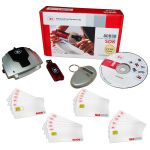
ACR38 Development Kit
The ACR38 series of USB readers — PC/SC and EMV Level 1 compliant, supporting ISO 7816 microprocessor cards and popular memory cards.
Kit contentsACR38U and ACR38T readers, an ABR08 balance reader, ACOS3 microprocessor cards (full-size and SIM-sized plug-in) and SLE memory cards, plus a development CD.
CDDemo programs (e-purse, logical access control), PC/SC CardTool, PC/SC Learning Tool, QuickView, Script Commander, sample code and reference manuals.
Sample code languagesMS Visual Basic .NET, Visual C#, Visual C++ (including x64 variants), Visual Basic 6.0, Java and Turbo Delphi 2006.
Documented OSWindows 2000, XP, Vista, 7 (32- and 64-bit).
See also ACR38 CCID SDK and the ACR38 reader.
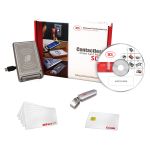
ACR120 USB SDK
The ACR120 contactless reader (MIFARE and ISO 14443 cards) and the ACR38DT DualKey, which accesses SIM-sized dual-interface “combi” cards through its contactless interface.
Kit contentsACR120 reader, ACR38DT DualKey, MIFARE 1K cards, a combi card and a development CD.
CDMulti-application demo (parking, train ticket, vending, weighing and loyalty stored value), time and attendance demo, ACR120 Tool, QuickView, sample code, reference manuals and technical specifications.
Sample code languagesVisual Basic, Visual C++, Borland Delphi, VB.NET and C#.
Documented OSWindows 98, 2000, XP, Vista (including XP and Vista x64).
ACR120 is end of life per ACS. See the ACR120 page and the ACR1281U-C8.
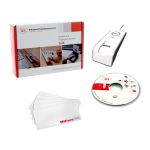
AET62 SDK
The AET62 NFC contactless reader with swipe fingerprint sensor, for adding fingerprint authentication to smart card applications without in-depth biometrics knowledge.
Kit contentsAET62 reader, MIFARE 4K cards and a development CD.
CDBiometric and BioBanking demos, EasyKey, NFC Reader Tool, QuickView, sample code, reference manuals and technical specifications.
Sample code languagesJava, MS Visual Basic 6.0, Visual Basic .NET 2008, Visual C# .NET 2008, Visual C++ 6.0 (including x64 variants) and Turbo Delphi.
Documented OSWindows XP, Vista, 7 (32- and 64-bit).
See the AET62 SDK page.
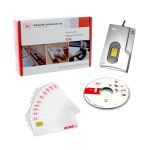
AET63 BioTRUSTKey SDK
The AET63 BioTRUSTKey, combining a smart card reader and fingerprint sensor.
Kit contentsAET63 BioTRUSTKey, ACOS3 microprocessor cards and a development CD.
CDApplication, BioBanking and functional demos, PC/SC CardTool, FormatACOS and TFM EEPROM Loader, QuickView, sample code and reference manuals.
Sample code languagesBorland Delphi 7.0, MS Visual Basic 6.0 and MS Visual C++ 6.0.
Documented OSWindows 98, ME, 2000, XP (including XP x64); drivers also listed for Linux kernels below 2.6.
See the AET63 SDK page.
_SDK.jpeg "ACR100 SIMFlash SDK")
ACR100 SIMFlash (CCID) SDK
The ACR100 SIM-sized USB reader with on-board flash memory that acts as a normal flash drive, PC/SC and EMV Level 1 compliant.
Kit contentsACR100 SIMFlash (CCID) reader, ACOS3 SIM-sized cards and an SDK CD.
CDDemo program, Card Tool, PC/SC Learning Tool, QuickView, Scripting Tool, sample code, freeware flash partitioning tools and user manuals.
Sample code languagesMS Visual Basic .NET, Visual C#, Visual C++ (including x64 variants), Visual Basic 6.0, Java and Turbo Delphi 2006.
Documented OSWindows 2000, XP, Vista, 7 (32- and 64-bit).
ACR100 is end of life per ACS. See the ACR100 SDK page.
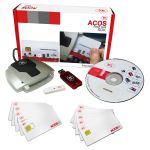
ACOS5 Cryptographic Card SDK
ACOS5 cryptographic cards (ISO 7816-1/2/3/4/8/9, RSA public-key operations, 32 KB EEPROM) for PKI, digital signature and Windows logon applications, developed over PKCS#11 or CSP.
Kit contentsACR38 and ACR38T readers, ACOS5 cards (full-size and SIM-sized) and a CryptoMate USB PKI token.
CDACOS5 Initialization, Clear Card and Admin tools (certificate, data object and secret key management), Card Tool, QuickView, PC/SC Learning Tool, CSP and PKCS#11 middleware, ACR38/ACR38T and CryptoMate drivers, sample code and manuals.
Sample codeACOS5 card commands, DES/3DES and RSA operations, CSP, PKCS and secure messaging — in Borland Delphi, Java, MS Visual Basic 6.0, Visual Basic .NET, Visual C# and Visual C++ 6.0.
Documented OSWindows XP, Vista, 7 (32- and 64-bit) and Linux.
See the ACOS5 SDK page.
Other SDK reference pages: ACOS6, ACOS7 and ACOS10, ACR122S, ACR33U-A1, ACR83 and ACR89U-A2.
Compatibility and Troubleshooting
Reader not detected
- Confirm the driver is installed — QuickView checks this on ACS kits
- For CCID readers, try the operating system’s built-in CCID driver before installing anything else
- Reconnect the reader to a different USB port and retest
Card not responding
- Check the reader supports that card type — contact vs contactless, and which contactless standard
- Test the card with the Card Tool before debugging your code
- Use the command set from the card’s own reference manual
Operating system mismatch
- Check the reader’s listed driver platforms in the table above
- Legacy kits document old Windows versions only — do not assume they cover your OS
- For Android with the ACR39U-UF, follow our setup guide
Older readers and kits
- Several legacy readers are end of life per ACS
- Replacement readers may need different card handling — retest before switching
- Ask BSD Infotech for a suitable current reader for your application
Frequently Asked Questions
Ready to Integrate a Smart Card Reader?
Tell us your card, reader, operating system and what your application needs to do. We will help you confirm the right reader and driver, and discuss integration or custom development.
Sales
Email: info@bsdinfotech.com