
Salon & Spa Management Software for Booking, Membership, POS and Inventory
One connected system for appointments, members, spa packages, billing and stock.
BSD Infotech provides configurable salon, spa and wellness management software for appointments, memberships, spa packages, billing, POS, inventory and customer management. Instead of running separate booking, billing and stock applications, the front desk, spa, service staff and management work from one set of member, service and sales records.
Talk to BSD Infotech
Tell us whether you run a salon, a spa, a wellness centre or a combination, how many locations you have, and whether you sell memberships or packages. We will arrange a demo and suggest a configuration.
What Is Salon Management Software?
Many salons and spas start with an appointment diary, a separate billing program and a spreadsheet for memberships and stock. The problem appears at the counter: the receptionist cannot see how many sessions a member has left, the bill does not reflect the membership discount, and stock is counted separately. BSD’s approach is to keep customers, members, services, bookings, sales and stock in one system, and to configure it around the way your business actually sells — by the service, by the package or by the membership.
What Does BSD Salon & Spa Software Manage?
Appointments
An appointment book by staff member, with day, month and year views, and bookings against a service, staff member, date and time.
Customers
Customer records with contact details, searchable by name, phone number, customer ID or invoice number.
Memberships
Membership categories with fee, validity and benefits; member registration, status and renewal tracking.
Spa bookings & packages
Spa bookings created against a package, with single-session and multi-session sales.
Session tracking
Total sessions assigned, sessions used and sessions remaining for each member.
POS & billing
Service and product sales by category, discounts, GST and printed invoices.
Payments
Cash, UPI, cheque, bank transfer and card, including more than one payment mode on the same bill.
Inventory
Item master with cost, selling price, opening quantity and reorder level; stock alongside sales.
Employees
Employee master, staff–service mapping, staff assignment on bookings and user access rights.
Reports
Sales, appointments, customers, employees and cash drawer reports, with export and print.
Renewals
Validity start and end dates, membership status and renewal due tracking.
Multiple locations
Multi-location or multi-centre setups can be supported depending on the deployment.
Modules are configured per business. A single-chair salon, a day spa and a membership wellness club do not need the same setup, and BSD scopes each installation to the workflows you actually use.
Salon Appointment Booking and Scheduling
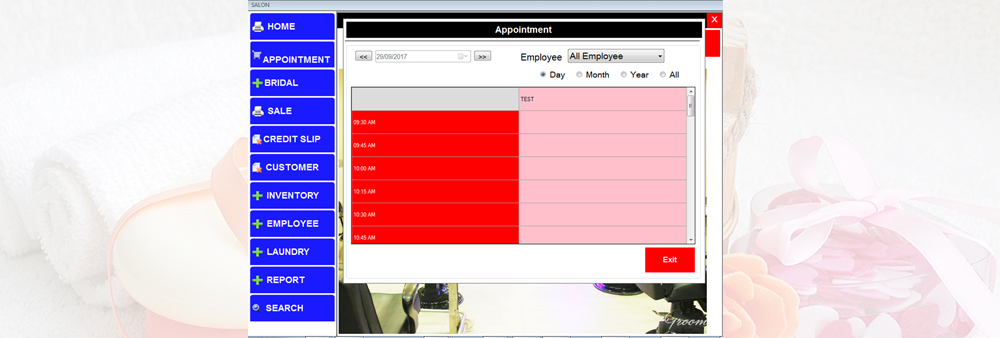
The appointment book is the front desk’s main screen. Appointments are shown by time slot and can be filtered by employee, so the receptionist can see who is free before confirming a booking. Each booking records the customer or member, the service, the staff member assigned, the date and the time.
- Appointment book by staff member, with day, month and year views
- Book against a service; the service’s duration comes from the service master
- Assign a staff member who is mapped to that service
- Reschedule or cancel appointments
- Event bookings (for example bridal appointments) with total amount, advance and balance
- Appointment reports for the front desk and management
In a recent wellness project, BSD also built a staff roster view in which marking a staff member absent flags that person’s bookings, so the front desk can re-assign or inform the member.
Bookings are made by salon or spa staff. Online self-booking by customers and customer mobile apps are not part of the standard scope described on this page; if you need them, they can be discussed as custom development.
Salon & Spa Membership Management Software
For salons, spas and wellness clubs that sell memberships, the membership record drives everything else: what the member pays, which discounts apply, which free sessions they receive and when they are due for renewal. BSD has developed membership workflows in which each of these is set once in a membership category and then applied automatically when a member is registered.
Membership categories
Each category holds its membership fee, validity period, tax, service discount and included spa benefits. Categories can be defined for tiers, durations, families or corporates, according to your own plans.
Member registration
Member name, mobile and email, address, category, membership type (new or renewal) and validity. Mandatory fields and mobile and PIN code formats are validated at entry.
Valid from / valid to
The start date is entered and the end date is calculated from the category’s validity period.
Membership payment
Membership fee from the category, optional discount, net payable, total paid and balance, with one or more payment modes.
Automatic bill generation
When the membership is saved with payment, a bill number and date are generated and the membership invoice can be printed.
Membership status & renewal
Status such as active, expired, cancelled or on hold, with renewal due tracking against the validity end date.
These workflows were specified and delivered in a recent membership, spa and POS project for a wellness club (described below). Categories, fields and rules are configured for each business, so your membership structure does not have to match that project’s.
Selling memberships already?
Send us your categories, fees, validity and benefits, and we will show how they would be set up.
Spa Management Software with Package and Session Tracking
BSD can configure spa management workflows that connect membership benefits, spa packages, bookings and session utilisation. Every spa booking is created against a package, so the system always knows what the member or customer has paid for and what is left.
Spa booking
Select the member or customer, the spa service and the staff member, then set the date and time. The booking screen shows the member’s visits taken and visits remaining.
Spa packages
Multiple packages with their own pricing and session counts, and a validity where required.
Single sessions
Sell a single spa session to a member or a walk-in customer.
Multi-session packages
Sell packages of several sessions, used over later visits.
Free sessions
Complimentary sessions allocated automatically from the member’s membership category.
Session usage
Total sessions, sessions used and sessions remaining, updated as bookings are consumed.
Spa services are set up in a service master with category, duration, price, tax and the number of visits the service includes. A category can give either a fixed number of free sessions, or several free packages — for example two head massages, one full-body treatment and three steam sessions — depending on how you structure your benefits.
Running a spa or day spa?
We can demo package sales and session tracking with your own services.
How Membership and Spa Benefits Work Together
The main difference between a connected system and separate booking and billing tools is what happens after the membership is sold. In the connected workflow, the membership category decides the benefits, the benefits become bookable sessions, and every booking reduces the balance the member can see at the counter.
This workflow was part of the requirements of BSD’s recent wellness-club project. Every business receives its own configuration; the category rules, packages and renewal handling shown here are an example, not a fixed product setup.
Salon POS and Billing Software
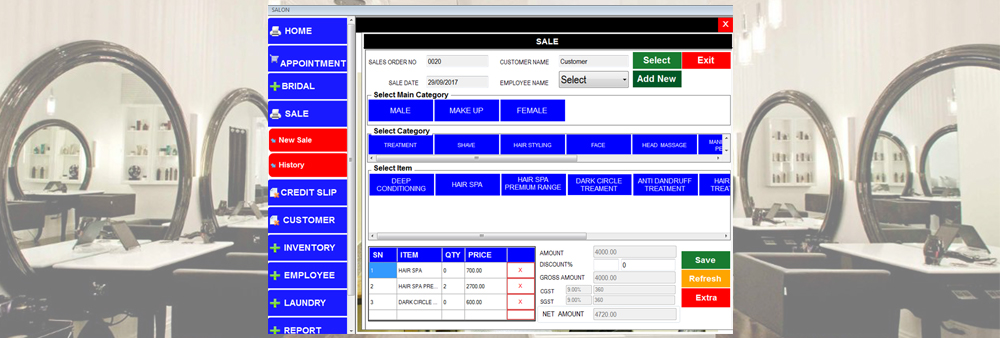
At the counter, services and products are selected from category buttons — for example hair styling, face, treatment or head massage — and the bill is built with quantities, prices, discount and GST. The same POS handles salon services, retail products and, where configured, membership, spa package and session sales.
- Item master and POS categories for services and products
- Touch-screen billing with category and item buttons
- Employee recorded against the sale
- Discount, CGST and SGST calculated on the bill, with HSN and tax masters
- Credit slips for services taken on credit, with a credit list
- Print the invoice or download it as PDF
- Sale history and search by invoice number
For POS terminals, receipt printers and cash drawers, see POS software and hardware. For billing outside salons and spas, see billing software.
Customer and Member Management
Walk-in customers and members are kept in the same system, so a customer who later takes a membership keeps their history. Member records hold the details needed to serve, bill and renew the member.
Member details
Name, mobile number, alternate mobile, email and date of birth, as configured.
Address
Address lines, city, state and PIN code for invoices and correspondence.
Membership
Category, validity dates, membership type and current status.
Benefits
Free spa allocation with sessions used and remaining.
Search
Find a customer by name, phone number, customer ID or invoice number.
Customer reports
Customer lists and reports that can be exported or printed.
Wellness businesses sometimes collect preference or health-related information at sign-up. BSD can configure such fields when a client asks for them; which fields to collect, and who can see them, is the business’s decision.
Salon Inventory Management
Salons and spas hold two kinds of stock: retail products sold over the counter, and consumables used during services. BSD salon software keeps both in an item master, alongside the services they relate to.
Products & consumables
Item code, name, description, cost, selling price and HSN code, grouped under service categories.
Stock levels
Opening quantity and reorder level for each item, with stock-in entries as goods arrive.
Service–consumable mapping
Consumables can be mapped to services where the business wants to see what each service uses.
Linen & laundry
Issue items such as towels to the laundry and record their return, with a laundry report.
Purchases
Purchase and supplier workflows through BSD’s inventory software, where required.
Inventory reporting
Stock and item reports next to sales, so product sales and stock can be reviewed together.
Exact inventory behaviour — for example whether consumables are deducted per service — depends on the configuration agreed for your business. For full stock, purchase and warehouse features see inventory management software and billing and inventory software.
Employee and Service Management
Service quality depends on booking the right person for the right service. BSD software keeps an employee master and maps each staff member to the services they perform, so only suitable staff are offered when a booking is made.
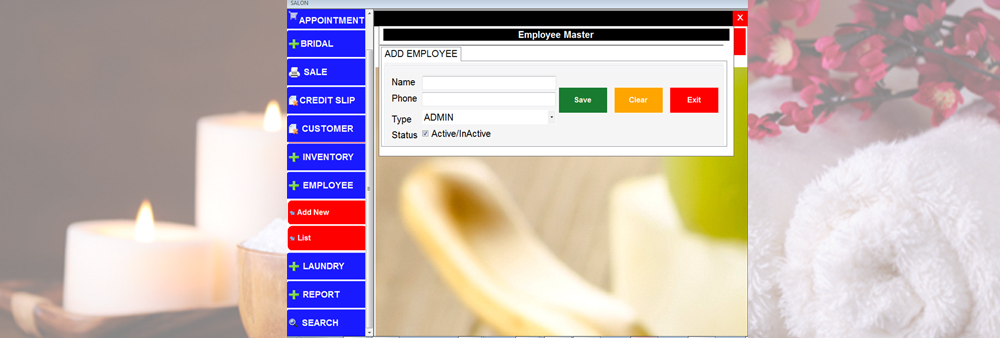
- Employee master with name, phone, user type and active/inactive status
- Staff–service mapping: assign or unassign services for each staff member
- Staff assignment on each appointment or spa booking
- Employee recorded on each sale
- Employee and employee-service reports for utilisation
- User logins with menu-level access rights, so each role sees only its screens
Payroll and commission calculation are not part of the scope described here.
Member Wallet for Advance Payments
Some wellness businesses let members pay in advance. A member wallet was one of the requirements of BSD’s recent wellness-club project: members deposit an advance amount, the balance is held against the member, and it can be used for spa packages, sessions and other payments the business chooses to allow.
The wallet is a configurable, project-specific capability, not a feature of every installation. Where a physical card is preferred, BSD’s cashless and smart card solutions can hold the member’s balance on a stored-value card.
Billing, Invoices and Payment Modes
Memberships and packages are often paid in more than one way — part by UPI and part by cheque, for example. The billing screen therefore records a payment grid rather than a single payment mode, and calculates what is still due.
| Payment mode | What is recorded |
|---|---|
| Cash | Amount received |
| UPI | Amount and transaction reference / UTR |
| Cheque | Amount, cheque number, cheque date and bank |
| Bank transfer (NEFT / RTGS) | Amount and transaction reference / UTR |
| Card | Amount, where card payment is configured |
Automatic calculation
Fee, discount and net payable; total paid is the sum of all payment rows, and balance is net payable minus total paid.
Payment status
Paid when the balance is zero, partially paid when an amount is pending. Excess payment can be credited to the member wallet where configured.
Invoice
Bill number and date generated automatically, with the payment breakup, GST and free-session summary, ready to print.
Payments are recorded against the bill at the counter. Online payment-gateway collection is not part of the scope described here; BSD can discuss it separately as an integration.
Inventory, POS and Services in One Flow
Because products, services and sales share the same masters, a sale at the POS is immediately visible in sales and stock reports. How far stock is updated automatically — for retail products only, or for consumables used in services too — depends on the configuration agreed for your business.
Salon and Spa Reports
Reports are drawn from the same records the front desk uses, so management sees what actually happened at the counter. Reports that BSD salon and wellness software has provided cover:
Sales & billing
Sale history, invoice search and cash drawer reports.
Appointments
Appointments by date and by employee.
Customers & members
Customer and member lists with contact and membership details.
Employees & services
Employee lists and employee-service activity.
Membership & spa usage
Membership status and validity, with spa sessions used and remaining.
Inventory
Items and stock, plus laundry issue and return where used.
Reports can be exported or printed. Additional reports and management dashboards can be added as part of a project.
Salon Software for Multiple Locations
Multi-location or multi-centre configurations can be supported depending on the deployment. Whether centres share one member database, keep separate stock and whether reports are consolidated are decided during scoping, because they depend on how the software is hosted and how your centres operate. Tell us how many locations you have when you enquire.
Custom Salon, Spa & Wellness Management Software
BSD is a software developer, not only a reseller of a fixed package. That matters for wellness businesses, whose membership rules and packages are rarely the same as anyone else’s. BSD can customise the software around your:
Membership structure
Categories, validity, fees, discounts and benefits.
Service catalogue
Service categories, durations, prices, taxes and visits.
Spa packages
Package names, session counts, pricing and validity.
Appointment workflow
Who books, how staff are assigned and how changes are handled.
POS & billing
Categories, invoice format with your logo, payment modes.
Inventory & reports
Stock rules and the reports your management needs.
Wallet
Advance deposits and what the balance can be used for.
Hardware
Touch POS terminals, receipt printers, cash drawers, barcode scanners and smart card readers.
Integrations
Links to other business systems, such as Tally, where required.
All customisation is subject to technical feasibility and project requirements.
Need something specific?
Share your membership rules, packages and workflow, and we will scope a customised solution.
Businesses That Use Salon and Spa Software
Many wellness businesses also run a café or juice bar. POS and inventory workflows can be extended to food and beverage operations where required — in BSD’s recent wellness-club project, a food and beverage module ran alongside membership and spa management. For stand-alone outlets see restaurant POS software; for gyms and clubs see club and membership management software.
Example: Membership + Spa + POS Workflow for a Wellness Club
Recent wellness & spa management project (2026). BSD documented and built a membership, spa management and POS workflow for a membership-based wellness club. The requirements were agreed with the client in January 2026 and the membership, spa and food and beverage modules were subsequently delivered and put into operation on a shared data platform.
Membership category
Fee, validity, tax, service discount and free spa benefits set in the category master.
Member registration
Member, contact and address details captured and validated.
Payment
One or more modes: cash, UPI, cheque, bank transfer or card.
Invoice
Membership bill generated automatically, with GST and payment breakup.
Validity
Valid-to date calculated from the category.
Free spa sessions
Allocated from the category to the member.
Spa booking
Service, staff, date and time, against a package.
Session usage
Sessions used and remaining updated.
POS
Service sales and billing with printable invoices.
Wallet
Advance deposit for packages and sessions, as specified.
Renewal tracking
Validity end and renewal due tracked per member.
The client is not named, and no member data, prices or commercial terms are published. The project is shown as an example of what BSD can build; each new installation is scoped to its own requirements.
How the Complete Salon & Spa System Works
Customer / member
A walk-in customer or a prospective member.
Registration
Customer or member record created.
Membership
Category, validity and benefits applied, where sold.
Appointment / spa booking
Service, staff, date and time.
Service
Delivered by the assigned staff member.
POS / billing
Services and products billed with GST.
Payment / wallet
One or more payment modes, or wallet where configured.
Inventory
Products and consumables tracked.
Reports
Sales, bookings, members and stock.
Renewal
Members due for renewal tracked.
The exact workflow depends on configuration. A salon without memberships skips steps 3 and 10; a membership spa may bill mostly through packages rather than single services.
Why Choose BSD for Salon and Spa Software
Software development
BSD builds and customises its own software, so workflows can be changed rather than worked around.
POS experience
BSD provides POS software for restaurants, retail, clubs and canteens, and supplies the POS hardware to run it.
Inventory
Stock and purchase workflows from BSD’s inventory software.
Membership
Membership, renewal and billing workflows, also used in BSD’s club management software.
Smart card / NFC
Member cards and stored-value smart cards where a business wants card-based identification or payment.
Workflow integration
Membership, spa, POS, inventory and F&B connected on one set of records.
Frequently Asked Questions
Discuss Your Salon / Spa Software Requirement
Tell us about your salon, spa or wellness business and the modules you need. We will arrange a demo and propose a configuration.
Helpful to include in your enquiry: business type (salon, spa, wellness centre) · number of locations · memberships or packages sold · modules needed (appointments, membership, spa packages, POS, inventory, wallet) · current software