
Asset Management Software and RFID Asset Tracking System
For organizations that manage fixed assets, IT equipment and movable equipment across offices, plants, warehouses and campuses.
BSD Infotech's asset management software helps organizations register fixed and IT assets and see where each one is, who has it and what maintenance it has had. It supports barcode, QR code, RFID and UHF RFID identification depending on the organization's workflow. Asset records, movements, audits, maintenance, depreciation and lifecycle information can be managed centrally across cloud or on-premises deployments.
Not ready for a demo? Get a free consultation.
Talk to BSD Infotech
Tell us what you want to track and where. We will suggest the identification method, deployment model and workflow.
Why Businesses Need Asset Management Software
Most asset problems begin as record problems. When registers are out of date, everything that depends on them, from audits to maintenance to depreciation, becomes slower.
Records live in spreadsheets
Asset information kept in Excel files goes out of date and differs between departments.
Assets are hard to locate
Without a location record, finding an asset means calling around or walking the floor.
Ownership is unclear
It is not always clear who is responsible for an asset or who holds it now.
Issue and return is manual
Handing over and taking back assets on paper leaves gaps in the custody history.
Movement is not recorded
Transfers between rooms, floors, branches and sites go unrecorded.
Manual audits take time
Verifying assets against a spreadsheet is slow and interrupts normal work.
Maintenance history is fragmented
Service records sit in different files, mailboxes or with individual people.
Depreciation is tracked separately
Values are maintained apart from the asset record, so the two drift.
Missing assets are found late
A loss often comes to light only at the next physical audit.
Large inventories are hard to audit
Checking a large number of assets one by one is a major exercise.
Procurement is disconnected
Purchase requests, approvals and asset registration live in separate places.
Contracts, licenses and compliance
Warranty, contract and license renewal dates and compliance records are hard to keep track of.
Complete Asset Management Software for the Asset Lifecycle
BSD Infotech's software manages an asset from the request to buy it to its disposal. For RFID-specific detail, see our RFID asset tracking page.
Acquire and register
- Procurement
- Requisition
- Asset registration
- Contract management
- License management
Track and control
- Asset tracking
- Asset allocation
- Asset issue and return
- Asset movement
- Asset ownership
- Asset location
- User and borrower management
Maintain and audit
- Asset condition
- Asset maintenance
- Asset audit
- Compliance
Value and report
- Asset depreciation
- Asset lifecycle management
- Reports and dashboards
How Asset Tracking Software Works
Ten steps take an asset from first registration to management reporting.
Register the asset
Create the asset record: category, supplier, brand, model, serial number, cost, warranty and location.
Assign a unique asset ID
Each asset gets one ID that ties every later record to it.
Attach an identifier
Label the asset with a barcode, QR code, RFID tag or NFC tag, according to the asset and the workflow.
Assign the asset
Allocate it to a person, department or location so that ownership is on record.
Issue the asset
Issue it to a custodian or borrower, with the date and effective date recorded.
Record movement or transfer
Log location changes, so the history shows where the asset has been.
Record maintenance
Keep service dates, next-service dates and maintenance history with the asset.
Conduct asset audits
Compare physical assets with system records and list what matched and what did not.
Track depreciation and lifecycle
Keep depreciation and lifecycle information with the asset, through to disposal.
Generate reports
Review ownership, location, audit and asset history reports for management.
See the workflow on your own assets
We can walk through registration, tagging, issue, movement and audit using your asset types.
Barcode, QR Code, RFID or UHF RFID: Which Should You Use?
There is no single right answer. The right identification method depends on the asset, the number of assets and how often you audit.
| Technology | How it works | Best suited for | Considerations |
|---|---|---|---|
| Barcode | Individual optical scan of a printed label | General assets, IT equipment, furniture | Each asset is scanned one at a time and the label needs to be visible |
| QR code | Read with a camera or QR scanner | Low-cost asset identification | Requires scanning; the label needs to be visible and undamaged |
| RFID | Radio-based identification of a tag | Contactless identification of assets | Read range depends on the RFID technology and the tag used |
| UHF RFID | Longer-range radio identification; multiple tags can be read together | Large asset inventories and audits | Tag type, asset material and the reading environment matter |
Tags, labels and scanning hardware
Asset Management Software Features
Twelve capabilities in one application, so registers, custody, maintenance and audits stay in step.
Asset Registration
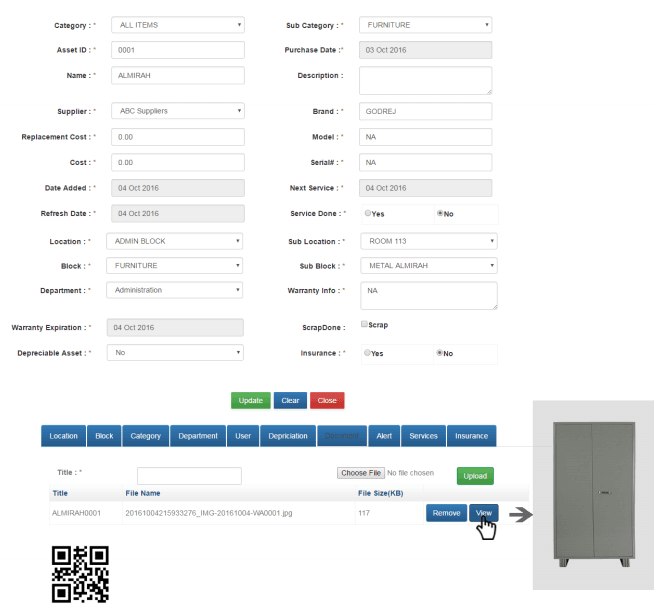
Centralized asset master information: category, supplier, brand, model, serial number, cost and warranty.
Asset Allocation and Custody
Assign assets to employees, departments or locations, and keep a record of who holds what.
Asset Movement
Record transfers and keep the movement history of each asset.
Asset Audit
Compare physical assets with system records and see what was and was not found.
Asset Maintenance
Track service and maintenance history, with service and next-service dates.
Asset Depreciation
Track depreciation information throughout the asset lifecycle.
Procurement and Requisition
Manage asset acquisition and requisition workflows.
Contract and License Management
Manage relevant contracts, licenses and renewal information.
Compliance Management
Maintain the information required for asset-related compliance processes.
Reports and Dashboards
Give management visibility into asset status, ownership, location and history.
Asset Lifecycle Management
Track assets from procurement through to disposal.
User and Borrower Management
Track custody and responsibility for assets.
From the application
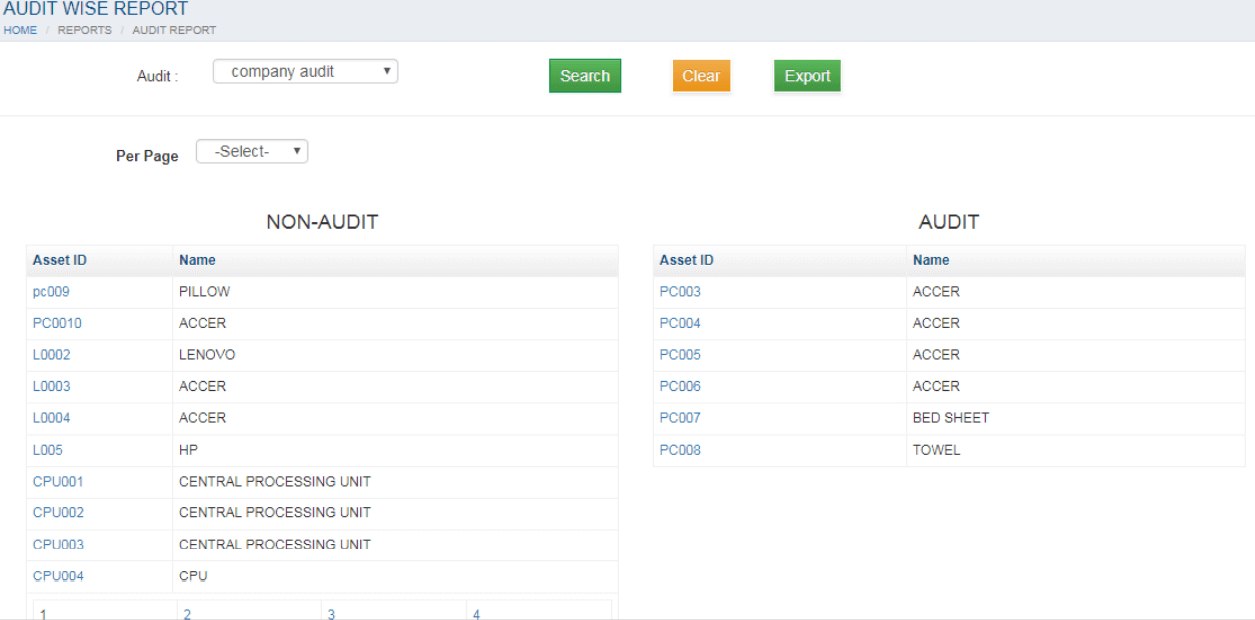
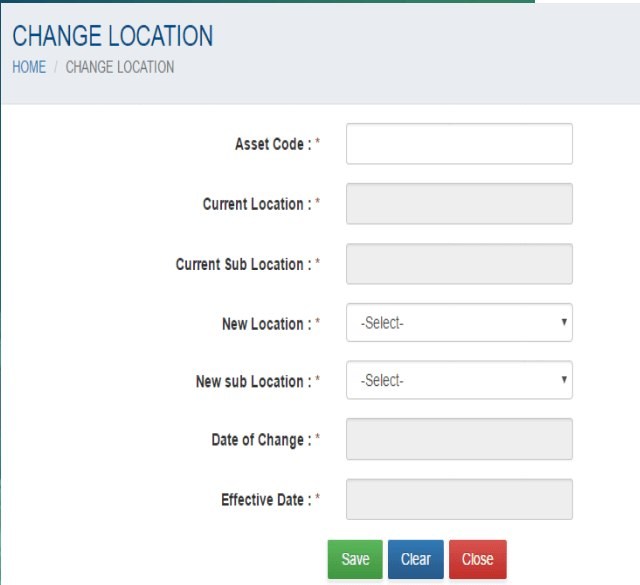
The module list also includes cost tracking and IT service management. Screens shown use sample data.
Cloud or On-Premises Asset Management Software
BSD Infotech supports both deployment approaches. Neither is presented as better; the right choice depends on your IT policy, locations and access needs.
Cloud
Suitable for organizations that want centralized access to asset records across offices and locations, and managed infrastructure.
On-premises
Suitable for organizations that prefer to deploy the software within their own infrastructure. Server and software requirements are confirmed at implementation.
Integrate Asset Management With Your Existing Systems
Integration is available based on the customer's system and project scope.
ERP
Share asset and cost data with your ERP system.
HR systems
Link custodians and departments to employee records.
Finance and accounting
Pass asset and depreciation information to accounting.
Inventory
Keep asset and stock records consistent. See inventory management software.
Procurement
Connect purchase requests to asset registration.
Maintenance systems
Align service schedules and maintenance records.
CRM
Track assets that are used by particular customers.
Other business applications
Custom connections are possible through customized software development.
BSD Infotech reviews your existing systems and the scope of the project during the requirement discussion. The integrations available depend on the systems involved.
Asset Management Software for Different Industries
The same asset register adapts to what each organization owns. These are typical asset types, not a list of customers.
Manufacturing
Typical assets: Production machines, tools, fixtures and returnable containers.
Warehouses
Typical assets: Handling equipment, containers, pallets and handheld devices.
Corporate offices
Typical assets: Furniture, laptops, phones, projectors and other equipment across floors and branches.
IT departments
Typical assets: Laptops, desktops, servers, network devices and peripherals, with warranty and license dates.
Hospitals
Typical assets: Medical and diagnostic equipment, furniture and IT equipment.
Hospital management software →Educational institutions
Typical assets: Laboratory equipment, computers, audio-visual equipment and furniture across campuses.
School attendance system →Logistics
Typical assets: Vehicles, containers, handling equipment and devices.
Logistics management →Retail
Typical assets: Store fixtures, POS hardware, display units and IT equipment across outlets.
Jewellery
Typical assets: High-value items and showcase equipment. See the jewellery case study below.
Jewellery software →Government and PSUs
Typical assets: Office, IT, furniture and field equipment across departments and locations, with custody and audit records.
Asset Management Case Studies
Three implementations, described without customer names. Figures are outcomes reported for these implementations.
Manufacturing and warehouse
A manufacturing company needed to know where its production equipment was and how it was being used.
SolutionUHF RFID asset tracking of the production equipment, monitoring location and utilization.
OutcomeThe company identified inefficiencies in its production process, optimized asset allocation and reduced downtime. Cost savings of over 20% were reported.
Jewellery
A jewellery business in Delhi spent many manpower hours on stock ticking of its silver items and depended on particular employees to do it.
SolutionUHF RFID asset tracking of the silver items.
OutcomeTime spent on stock ticking fell by 80% and the whole cost was recovered in 4 months. The business also reported better inventory, less dependence on particular employees and manpower hours saved.
Logistics
A logistics company needed to monitor the location and maintenance of its fleet of vehicles and containers.
SolutionUHF RFID asset tracking of vehicles and containers, linked to maintenance records.
OutcomeThe company optimized its logistics operations, reduced transportation costs and improved asset utilization. A 15% reduction in fuel costs was reported.
Case-study outcomes were reported for these particular implementations. Results vary with the organization, the assets, the workflow and how the system is used, and are not a guarantee for other customers.
Discuss your own asset audit
Tell us what you track today and how long an audit takes. We will show how the software would handle it.
How We Implement Asset Management Solutions
Implementation is tailored to your asset volume, locations, workflows and identification technology.
Requirement discussion
Asset types, volumes, locations and who needs which information.
Workflow mapping
How assets are issued, moved, maintained and audited today.
Technology and tag selection
Barcode, QR, RFID, UHF RFID or NFC for each asset type.
Pilot or proof of concept
Where required, test tags and readers in your own environment.
Deployment
Set up the application on cloud or on-premises, then register and tag the assets.
Training
Initial training for the staff who run tagging, issue and audits, as part of the implementation scope.
Integration
Connect the application with your other systems where this is in scope.
Support and AMC
Ongoing support, with refresher training under AMC terms and user manuals for reference.
Start with a free consultation
Describe your assets and how you manage them today. We will suggest a practical approach and next steps.
Why Choose BSD Infotech for Asset Management
Facts about how we work, so that you can judge the fit.
Operating since 2005
Software and technology solutions from New Delhi for more than twenty years.
Software and hardware together
Application, tags, readers and handheld terminals from one provider.
All identification methods
Barcode, QR code, RFID, UHF RFID and NFC where relevant.
Cloud and on-premises
Both deployment approaches are supported.
Customized workflows
The software follows your process rather than the other way round.
Integration capability
Connection with your other systems, based on scope.
Implementation support
Requirement discussion through to deployment.
Training
Initial and refresher training for your team.
AMC and support
Ongoing support under annual maintenance terms.
Lifecycle management
From procurement to disposal in one system.
Reporting and visibility
Ownership, location, audit and history reports.
Frequently Asked Questions
Ready to Improve Your Asset Management?
Tell us what you need to track, where it is and how it is managed today. BSD Infotech can show the asset management software, recommend an identification method and discuss deployment and integration.