
NFC Access Control System
Use NFC cards, tags or compatible contactless devices to authenticate users and manage access to designated areas.
BSD Infotech designs NFC-based access control around your site and workflow: the cards or tags, the readers, the access-point hardware where needed, and the software that checks permissions and records every entry and exit. Hardware supply, installation support, software integration and custom development are separate services, quoted to your project.
Talk to BSD Infotech
Tell us the site, the number of access points, how many users and what the system must record. We will suggest an architecture and send a quotation.
What Is NFC Access Control?
Identify and verify
Identify the user from the card or tag, and verify that the user is authorised for that access point.
Record entry and exit
Record each entry and exit with date and time, and store or send the transaction data.
Apply rules and integrate
Apply access rules, trigger an access mechanism where fitted, and share data with other software.
How NFC Access Control Works
Not every NFC reader operates a door lock. A USB NFC reader connected to a computer passes the card data to software; to open a door or turnstile, the system also needs an access controller or relay and the lock, turnstile, gate or barrier itself. Some projects need no physical barrier at all: the software shows the result to an operator, who admits the user and the entry is recorded. The final architecture may include an NFC reader, access controller, electric lock, turnstile, gate or barrier, relay, software, and a database or server, depending on the project.
Typical NFC Access Control System Components
Not every project needs every component. We specify only what your access points and workflow require.
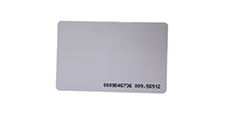
1. NFC card or tag
The user’s credential: a contactless card, key tag, wristband or compatible NFC device. See contactless cards and MIFARE cards.
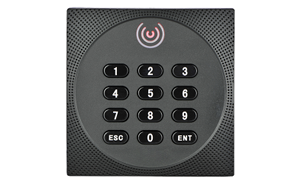
2. NFC reader
A PC-linked USB reader for desk or counter use, or a wall-mounted reader at a door that connects to an access controller.
3. Access controller
Decides and switches the lock or gate at the access point. Needed where a door, turnstile or barrier is operated automatically.
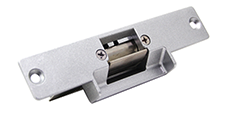
4. Door lock, turnstile or gate
Electric strike or electromagnetic lock, turnstile, flap gate or barrier, where the project controls a physical entry point.
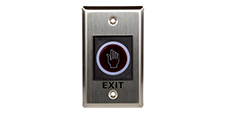
5. Exit device
An exit button or exit reader on the inside of a controlled door, where required.
6. Computer, server or network
A local computer, server or network connection, depending on how many access points share data.
7. Access control software
User registration, card assignment, permissions, logs and reports.
8. Database
Stores users, permissions and entry/exit transactions for reporting and integration.
9. Display, buzzer or indicator
Optional feedback at the access point: a light, sound or on-screen message showing the result.
Door controllers, wall readers, locks, exit buttons and other access-control accessories are listed on our access control hardware page.
NFC Access Control Applications
Applications BSD has built and shown
- Swimming pool member entry: NFC membership cards, validity check and entry/exit logs
- Petrol pump operations: smart-card-based authentication and fuel transaction records
Both are shown in BSD’s own demonstration videos below. Client names are not published.
Where NFC access control is commonly used
These are typical uses of the technology, not a list of BSD projects.
NFC Swimming Pool Access
A pool with a paper sign-in register cannot easily tell valid members from expired ones. In BSD’s swimming pool application, each member is given an NFC smart card carrying their membership, and entry is checked against it.
- Member management and card assignment
- Membership plans with validity
- Card blocking
- Entry and validity check with a printed slip, at the front desk or on a handheld machine
- Entry and exit marked by front-desk software, with daily logs
- Printed list of valid members before a shift; guest entries recorded in the system
- Reports
NFC Authentication for Petrol Pump Operations
For fleets and organisations that issue fuel to employees or vehicles, BSD has built smart-card and NFC applications that authenticate the card holder and record each fuel transaction.
- Fuel type and quantity entered by the operator; user authenticated by smart card and PIN on a POS terminal
- Printed slip for every transaction
- Monthly quantity limits per employee or per vehicle
- Consumption by unit or department
- Transactions stored and transferred to a PC for billing and accounting
- Mobile app version: sale slips with vehicle number, item, quantity and card balance; shift or day-end closing; card registration; admin dashboard
These examples authenticate users and record transactions. They do not include control of the fuel dispenser itself.
More detail: Petrol pump solution with NFC.
NFC Access Control Software
Features marked In BSD demos appear in the swimming pool and petrol pump applications above. Others are designed per project, on request.
Shown in BSD applications
- User or member registration
- Card assignment and card blocking
- Validity periods and usage limits
- Entry/exit logs with date and time
- PIN verification with the card
- Printed slips and reports
- Data transfer to a PC for billing and accounting
Available as custom development
- Access permissions by user, group, area and time
- User status and access history
- Offline transaction storage and synchronisation
- Multiple access points on one database
- Integration with HR, attendance, membership or ERP systems
- Dashboards and custom reports
Offline NFC Access Control
Where required, the application can be designed for offline operation, depending on the deployment architecture and synchronisation requirements. Offline capability is mainly a software and system design decision, not a feature of the reader alone. Typical approaches store the user list and permissions locally at the access point or on the card, record transactions locally, and synchronise with the central database when the connection is available. We confirm what works offline for your site before quoting.
Hardware and Reader Options
NFC readers are components of the system, not access controllers. We choose the reader for the card type, the location and the software.
ACS ACR1252U
USB NFC reader at 13.56 MHz supporting ISO 14443 Type A/B, MIFARE, FeliCa and ISO/IEC 18092 NFC tags, PC/SC and CCID compliant. For registration desks and PC-based entry points.
ACS ACR1552U
USB NFC reader supporting ISO 14443 A/B, ISO 15693, ISO 18092, MIFARE and FeliCa, CCID and PC/SC compliant. Useful where ISO 15693 tags are also used.
ACS ACR1555U / ACR1255U-J1
Bluetooth NFC readers for handheld or tablet-based checks, such as entry checks away from a desk.
ACS ACR1581U / ACR1281U-C1
Read both contact and contactless cards, for projects that also use chip cards or need card personalisation at a desk.
Wall readers, controllers and locks
Wall-mounted card readers with Wiegand output, door controllers, electric locks and exit buttons for doors and gates.
Contactless cards and tags
MIFARE and other contactless cards, key tags and wristbands, printed or plain.
ACS lists access control among the applications for the ACR1252U, ACR1552U and ACR1281U-C1. Reader specifications are from ACS documentation; see each product page for full details and current pricing. The ACR122U is end of life at ACS; BSD Infotech keeps it in regular supply for existing systems, and ACS recommends the ACR1552U for new deployments. All contactless and NFC readers.
Need to Integrate NFC Access Control With Existing Software?
BSD can provide chargeable integration support to connect NFC readers and access records with the software you already use, subject to technical feasibility and available device SDK/API. Integration is a separate service and is not included in the hardware price. For reader SDKs and PC/SC development, see Smart Card Reader SDK and Integration.
Have an existing application?
Tell us what it runs on and what data it needs from the access points.
Installation & Configuration Support
BSD can provide installation and configuration support for supported NFC access-control deployments. Requirements depend on the number of access points, the reader and controller hardware, the doors or gates, the network architecture and the software. Installation is quoted separately and is not included in the hardware price; on-site support depends on the project location, so we confirm it when quoting.
Complete Custom NFC Access Control Solutions
If you need more than the NFC hardware, BSD can develop or customise software around compatible NFC readers and access-control hardware. Depending on the project, this can include user management, access permissions, entry/exit tracking, database integration, reports, synchronisation and business-specific workflows. Software development is project-based and chargeable; buying hardware does not include custom software development.
Architecture options
NFC reader + software
A desk or counter reader with software that checks the user and records entry. An operator admits the user.
Reader + controller + door/gate + software
Automatic control of a door, turnstile or barrier, with entry/exit records in the software.
NFC access control + integration
Access events sent to your existing application, database or HR, attendance or membership system.
Complete custom application
An NFC access control application built for your workflow, rules and reports.
These are architecture options, not fixed packages. Each is quoted to the project. For other NFC and smart card workflows, see NFC and smart card application development.
NFC Access Control Hardware & Solution Supply
BSD supplies suitable NFC readers, cards and tags, compatible hardware and access-control components, subject to project requirements and current availability. Contact BSD for current pricing and availability.
1. Hardware supply
NFC readers, cards and tags, and access-control hardware, supplied across India.
2. Installation and configuration
Setup of readers, controllers and software, where applicable. Quoted separately.
3. Software integration
Chargeable integration with your existing software, subject to technical feasibility.
4. Custom application
Project-based development of a complete NFC access control application.
These are separate services and may have separate charges.
NFC vs Other Access Technologies
| Technology | How the user is identified | Contact | Typical use | Hardware | Integration considerations |
|---|---|---|---|---|---|
| NFC / card | Something the user carries: card, tag or phone | Contactless | Offices, campuses, clubs, members, staff | Reader, cards or tags; controller and lock for doors | Card issue and blocking; a lost card can be used by someone else unless combined with a PIN or biometric |
| Fingerprint | Something the user is | Contact with the sensor | Staff entry and attendance | Fingerprint reader or terminal | Enrolment of each user; scanner SDK; privacy of biometric data |
| Face recognition | Something the user is | Contactless | Staff entry and attendance | Face terminal or camera | Enrolment; lighting and placement; privacy of biometric data |
| QR code | A code on paper or a phone screen | Contactless | Visitors, events, temporary passes | QR scanner or camera | Codes are easy to copy, so they are usually time-limited or single-use |
| PIN | Something the user knows | Keypad | Simple doors, or a second factor with a card | Keypad reader | PINs can be shared or observed |
No single technology suits every site. The right choice depends on the environment, the user population, your security requirements, existing infrastructure, budget, integration needs, the number of people passing through, and whether the system must work offline. Many projects combine methods, such as a card with a PIN or a card with a fingerprint. See also fingerprint readers and visitor management.
How Much Does NFC Access Control Cost?
There is no single price for an NFC access control system. The cost depends on:
Request a quotation
Send us the number of access points, users and the records you need. We will send a quotation with hardware, installation and software shown separately.
Frequently Asked Questions
Request an NFC Access Control Solution
Tell us your site, access points, users and existing software. We will suggest an architecture and quote hardware, installation, integration and software separately.