
Online Mock Test & Quiz Software for Coaching Institutes
Your academy can create its own tests and let your students take them online.
Create and conduct online mock tests, quizzes, practice tests and examinations for your students from a centralized test management platform.
Designed for academies and coaching institutes that want to move tests from paper or basic online forms to a structured digital testing experience.
Request a Demo Discuss Your Testing RequirementWhat Is Online Mock Test Software?
Online mock test software lets an academy or institute create tests and have students attempt them through a web browser instead of on paper. The institute sets up each test — its questions, duration and availability dates — registers or assigns students, and reviews results centrally. The exact evaluation, scoring and reporting depend on how the platform is configured for the institute.
Who Is It For?
- Coaching institutes
- Competitive exam academies
- Tuition centres
- Training institutes
- Schools
- Colleges
- Skill-development institutes
- Corporate training & hiring tests
Each institute configures the tool for its own tests; not every customer needs the same features.
One Platform for Creating, Conducting and Managing Tests
BSD’s E-Examination Tool is a web-based test management system with an admin panel for tests, questions, candidates, results and marks. Nothing needs to be installed on the student’s computer.
Dashed step: analytics beyond test results are developed as a customization.
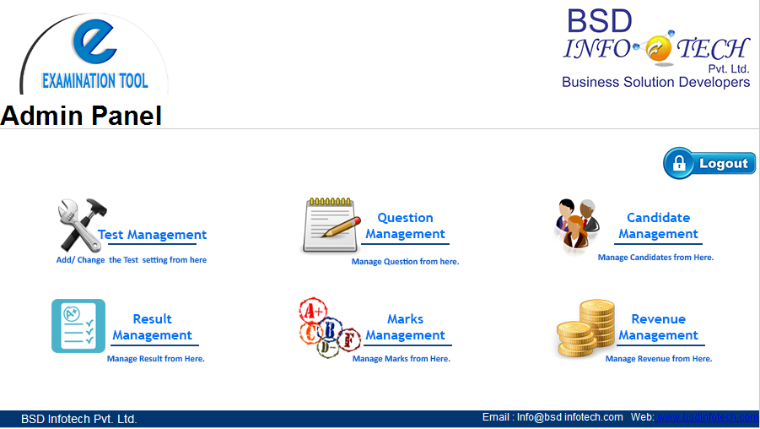
What the admin panel covers
- Test management — create and modify tests In BSD’s tool
- Question management — add questions to each test In BSD’s tool
- Candidate management — register students and assign tests In BSD’s tool
- Result management — view results test-wise and per student In BSD’s tool
- Marks management In BSD’s tool
Build and Reuse Your Question Bank
Questions are added to each test through Question Management, for objective or subjective test types, and edited when needed. The questions belong to your academy.
- Add and edit questions for each test In BSD’s tool
- Objective and subjective question types In BSD’s tool
- A central, reusable question bank organised by subject and chapter, used to build new tests Customization
- Bulk import of questions from a file Customization
Create Tests for Different Learning Needs
The tool accommodates any number of tests. Name and configure each one for its purpose:
Mock Tests
Full practice papers before the real examination.
Quizzes
Short objective tests for classroom or online engagement.
Chapter Tests
Check understanding of one chapter or topic.
Subject Tests
Assess a single subject.
Weekly Tests
Regular progress checks with their own validity dates.
Practice Tests
Low-pressure practice before formal tests.
Full-Length Tests
Longer papers built around your institute’s pattern.
Custom Tests
Tests set up to your academy’s own requirements.
Create Your Own Online Test Series
Because every test has its own validity window, an academy can plan a series of tests across the course and open each one in turn:
The series structure is configured to your requirements. A dedicated test-series layer (series grouping, series-level reports or paid access) is developed as a customization.
Timed Online Tests
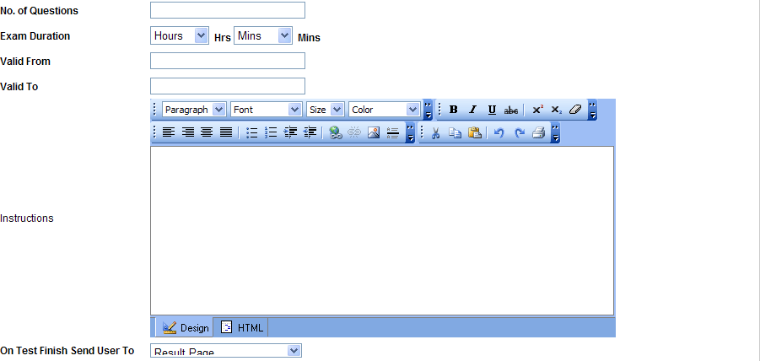
Configured test duration and timed attempt. For each test the admin sets:
- Number of questions
- Exam duration in hours and minutes
- Valid from and valid to dates, so the test is available only in that window
- Instructions shown to students
- Where the student goes when the test finishes, such as the result page
Scoring, Negative Marking and Randomised Tests
Institutes preparing students for competitive exams often ask for these. They are not part of the standard tool and are developed as a customization for your examination pattern:
- Positive and negative marking per question Customization
- Random question selection and multiple question sets Customization
- Answer-option shuffling Customization
A Simple Online Test Experience for Students
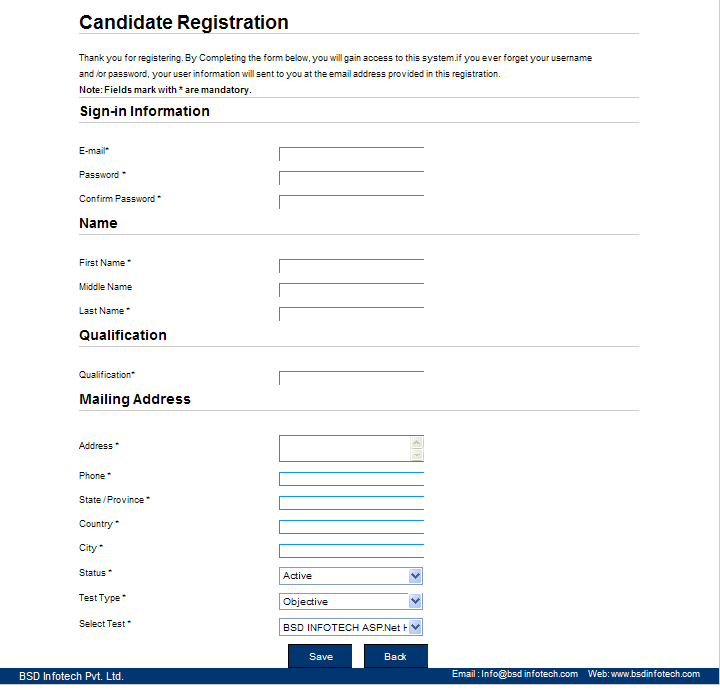
Students register with their email and a password, or the admin creates their account, and the admin assigns the test. After finishing, the student can be taken to the result page, as configured for the test.
Browser access: the tool is web-based, so students take tests through a browser on supported devices. A mobile-optimised student interface or app can be developed with BSD’s mobile application team.
Results and Score Management
- Results filtered by test type and test In BSD’s tool
- Each candidate’s percentage score, with a view of the individual result In BSD’s tool
- Paper evaluation by the admin, including subjective answers In BSD’s tool
- Ranks, percentiles and accuracy Customization
Performance Analysis
The standard tool reports test results. Additional analytics can be developed according to the institute’s reporting requirements, for example subject-wise and test-wise performance, batch comparison, weak topics and score trends over a test series.
Manage Students, Tests and Results from One Place
| Area | What the admin does | Status |
|---|---|---|
| Tests | Create and modify tests; set questions, duration, validity and instructions | In BSD’s tool |
| Questions | Add and manage objective and subjective questions per test | In BSD’s tool |
| Candidates | Create users, register students, assign or unassign tests | In BSD’s tool |
| Results & marks | View results by test and candidate; manage marks | In BSD’s tool |
| Batches | Assign tests batch-wise (Batch A, morning or evening batch) | Customization |
| Staff roles | Separate teacher and admin rights | Customization |
Use Online Tests Across Your Academy
Coaching institutes
Regular weekly tests and mock examinations.
Tuition academies
Chapter and subject tests.
Skill & training institutes
Knowledge and competency assessments.
Corporate teams
Training assessments and hiring tests.
Online Mock Tests for Competitive Exam Preparation
Academies preparing students for exams such as JEE, NEET, SSC, banking, railway, UPSC, state-level and other entrance examinations can run their own practice and mock tests on the platform. BSD Infotech provides the testing technology; it is not affiliated with any examination authority, and the tests are created by your academy.
Need a Testing Platform Built Around Your Academy?
BSD Infotech develops customized software, web applications and mobile applications, and the E-Examination Tool can be adapted to your workflow. Customization depends on the required workflow and technical scope.
Test workflow
Custom test flow, question formats, marking and series structure.
Reports
Custom reports and analytics for your academy.
Academy branding
Custom branding and academy-specific interfaces as part of a customized deployment.
Security
Additional examination-security controls, based on your requirements.
Integrate Testing with Your Existing Systems
BSD can develop APIs or custom integrations where required — for example with your student database, academy ERP or CRM, your website, a payment system or a custom mobile app. Integrations are scoped for each project; none is claimed as ready-made.
Online vs Paper Testing
| Paper test | Online test | |
|---|---|---|
| Delivery | Printing and manual distribution | Delivered through the browser within a set validity window |
| Management | Papers handled test by test | Tests, questions and candidates managed centrally |
| Checking | Manual checking | Evaluation through the system, as configured |
| Results | Manual result preparation | Results by test and candidate in the admin panel |
| Records | Physical storage | Digital result records |
Want to Run Online Tests for Your Students?
Tell us about your academy, number of students and the type of tests you want to conduct. We can demonstrate the platform and discuss the configuration required for your testing workflow. Helpful details:
- Academy / institute name
- Number of students
- Type of tests (mock, quiz, chapter, series)
- Expected number of tests
- Current testing method
- Customization needed
Online Mock Test Software FAQs
Also known as BSD’s E-Examination Tool. Download the brochure (PDF) · Readymade software