Billing Software for Business
Create and manage invoices, sales bills and billing records.
For businesses that need reliable billing and invoice management, from a single counter to several shops, connected to inventory, POS, accounting and Tally when you need them.
Talk to BSD InfoTech
Tell us how you bill today. We will show you the billing software and how it fits your process.
Need billing and stock together?
This page is about billing. If you also want purchases and stock in the same system, see BSD’s billing and inventory software.
What BSD Billing Software Does
The Billing Workflow: Customer to Report
From the customer at the counter to the register you review, in plain business steps.
Customer
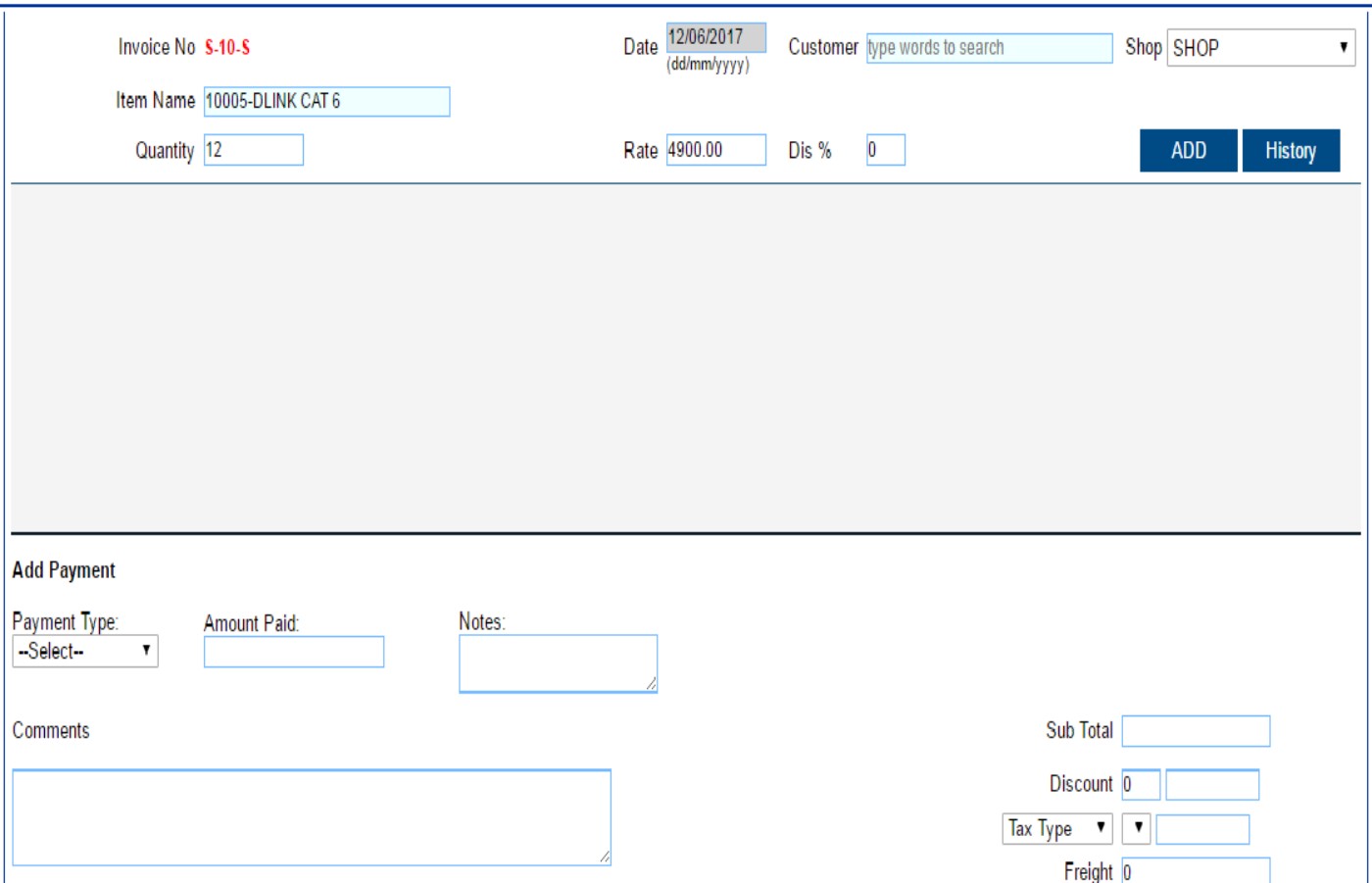
Search for the customer by typing a few words, or bill a counter customer.
Product / Service
Add items by name or barcode with quantity, rate and a discount percentage.
Billing
Apply discount, tax type and freight. Sub total and total are worked out for you.
Invoice
The bill gets an invoice number and date and prints in a standard format. View it, print a duplicate or void it.
Payment
Record the payment type and amount paid, such as cash, cheque, credit or account.
Where you need more than billing
Screens and steps shown are from BSD’s billing screens. Your set-up, invoice format and payment modes are confirmed in the demo.
Core Billing Features
What the billing software does at the counter and behind it, as shown on BSD InfoTech’s billing screens.
Invoice creation
Create an invoice with its number, date, customer, items, quantity and rate, in a standard format.
Sales billing at the counter
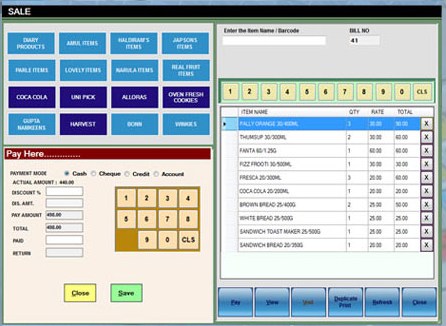
A counter sale screen with item-name or barcode entry, category buttons, a bill number and a pay panel.
Customer billing
Bill a named customer, found by typing a few words of the name.
Discount, tax and freight
A discount percentage on each item, a discount on the bill, a tax type and percentage, and freight, with sub total and total.
Payments
Record the payment type and the amount paid, with modes such as cash, cheque, credit and account, and notes.
Invoice control
View a bill, print a duplicate or void it from the sale screen.
Barcode billing
Enter an item name or scan a barcode to add it to the bill.
Shop-wise billing
Each sales invoice is raised against a shop, and the dashboard lists the latest bills by shop.
Invoice Customization and Branding
Make invoices look like your business. These options are described in BSD’s billing documentation, and we confirm the current set in a demo.
Company logo and theme
BSD’s billing software is documented as printing your company logo and theme on invoices.
Company and tax details
Show your company name, contact details and tax registration numbers on the invoice.
Invoice header and notes
Choose the heading, such as INVOICE, TAX INVOICE or CASH MEMO, and add notes such as terms and conditions at the foot.
Preview before printing
BSD’s billing documentation lists a run-time preview of the invoice.
Documented in BSD’s billing brochure
Also described: amounts printed in words, email settings for sending invoices, and saving each invoice as a PDF. Features vary by version, so we confirm the current set in a demo. Download the billing brochure (PDF).
Products, Services and Pricing on Invoices
Bill what you sell, at the price you agreed.
Products
Add products by name or barcode, each with its quantity, rate and discount.
Multiple services
BSD’s billing documentation lists the management of multiple services.
Product plan configuration
Product plans can be configured, as listed in BSD’s billing documentation.
Tax master
Tax names and percentages are kept in a tax master and chosen on the invoice.
Customer-specific price lists, described in BSD’s billing brochure, let different customers be billed at their own prices. Confirm availability for your version in a demo.
Billing Records, Reports and Export
Every bill is a record. Sale registers turn those records into totals you can review.
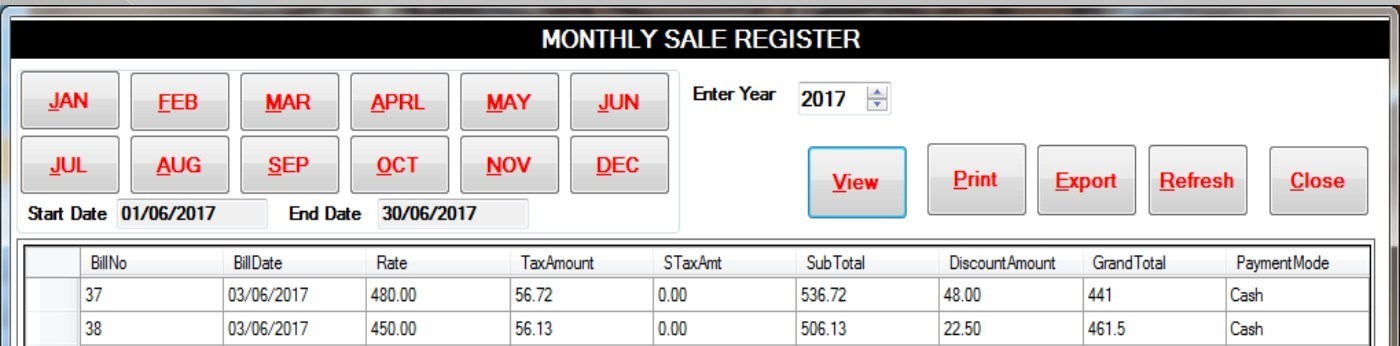
- Monthly Sale Register and Daily Sale Report
- Item Sale Register
- Bill number, date, rate, tax, sub total, discount, grand total and payment mode
- Print and Export buttons on the registers
- Exports documented in Excel and PDF formats
- Latest bills listed on the dashboard
BSD’s billing documentation also lists searching and filtering invoices by date, number or party name, and emailing an invoice as a PDF.
Security and Access
Password protection
BSD’s billing software is documented as providing password protection for your database.
User access
BSD’s billing and inventory software allows multiple users with different access rights.
Backup and restore
The billing brochure describes backing up your data with a button and restoring it the same way.
Other security features, such as encryption or audit logs, are not part of what we describe here. Ask BSD InfoTech about your requirement.
Billing with Inventory Management
Sales, then stock, then reports
When billing sits alongside inventory, each sale is raised against a shop and stock is reported by shop or warehouse. BSD’s billing and inventory software lists offline, online and hybrid versions. The inventory page carries the stock detail.
Billing and POS
Counter billing with POS hardware
Businesses that need counter billing, barcode devices, touch POS, receipt printers or multi-outlet POS can use BSD InfoTech’s POS software and hardware. The POS page carries the detail.
Billing and Accounting
Billing feeds your books
Billing is the operational side: bills, payments and registers. Accounting is the financial side: the general ledger, journal entries, receipts, payments and bank reconciliation. How billing data reaches your accounts is agreed for your set-up.
Tally Integration for Billing Data
Already using Tally?
BSD InfoTech’s Tally integration syncs billing, inventory and accounting data with Tally, reduces duplicate manual entry, updates vouchers and ledgers automatically, and supports custom data export and import formats on request.
Where BSD Billing Software Is Used
Billing needs differ by business. Where BSD has a dedicated solution, it is linked.
Retail
Counter billing with barcodes and customer records.
Wholesale
Invoices to trade customers with discount, tax and freight.
Restaurants and cafes
POS billing for restaurants, cafes and similar outlets.
Restaurant Management Software →Hospitality and clubs
BSD’s POS software supports multiple outlets at hotels, clubs and service apartments.
POS Software and Hardware →Multi-location businesses
Bills raised against a shop, for several shops in one system.
Choose the Right BSD Page
A quick guide to where each requirement is covered.
| Requirement | BSD page |
|---|---|
| Billing and invoicing | Billing Software (this page) |
| Billing + inventory | Billing and Inventory Software |
| Inventory management | Inventory Software |
| Accounting | Accounting Software |
| POS | POS Software and Hardware |
| Tally integration | Tally Integration |
| Restaurant operations | Restaurant Management |
| Cashless transactions | Cashless Solution |
Pricing
Request Current Pricing
Pricing is quoted for your requirement. It can depend on the number of users, your billing requirements, modules, deployment, integrations such as inventory, POS, accounting or Tally, customization, and any hardware you need.
Frequently Asked Questions
Need Billing Software for Your Business?
Tell us how you create invoices and bills today, and what you want to connect, such as inventory, POS, accounting or Tally. BSD InfoTech can demonstrate the billing software and discuss customization where required.
Call BSD InfoTech
- © 2005–2026 BSD Infotech Pvt. Ltd. All Rights Reserved
- Designed & Developed By BSD InfoTech Pvt. Ltd.