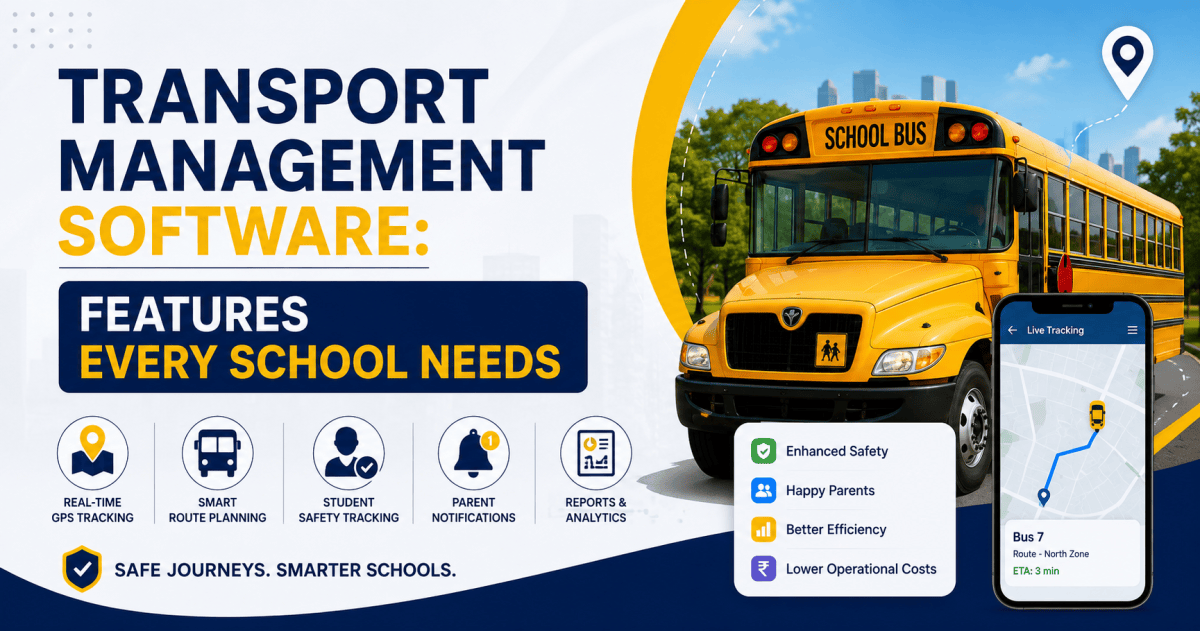
Vehicle Tracking Systems: A Complete Guide for Institutions
Contents
- What Is a Vehicle Tracking System?
- How Does Vehicle Tracking Work?
- Why Do Institutions Need Vehicle Tracking Systems?
- Key Features of an Institutional Vehicle Tracking System
- 1. Real-Time GPS Tracking
- 2. Geofencing
- 3. Route Monitoring
- 4. Speed Monitoring
- 5. Historical Trip Tracking
- 6. ETA and Arrival Notifications
- 7. Emergency Alerts
- 8. Fleet Dashboard
- Vehicle Tracking for Different Institutions
- Schools
- Colleges and Universities
- Hospitals
- Corporate Organizations
- Manufacturing and Industrial Institutions
- Vehicle Tracking System vs. Traditional Fleet Management
- Benefits of Vehicle Tracking Systems for Institutions
- What Should Institutions Consider Before Buying a Vehicle Tracking System?
- 1. Tracking Accuracy
- 2. Network Connectivity
- 3. Hardware Reliability
- 4. Software Platform
- 5. Mobile Access
- 6. Alert Configuration
- 7. Historical Reports
- 8. Scalability
- 9. Integration
- 10. Data Security and Access Control
- How to Implement a Vehicle Tracking System
- The Future of Institutional Vehicle Tracking
- Frequently Asked Questions
- What is a Vehicle Tracking System?
- Can schools use vehicle tracking systems?
- Can colleges use GPS vehicle tracking?
- Does vehicle tracking only show location?
- Is vehicle tracking useful for hospitals?
- What is geofencing in vehicle tracking?
- Can vehicle tracking reduce transportation problems?
- Conclusion
Managing transportation for an institution is much more than knowing where a vehicle is located.
Schools need to know whether students are travelling safely. Colleges and universities need visibility across campus and shuttle routes. Hospitals may need to monitor ambulances and support vehicles. Corporate organizations may need to track employee transport and company fleets.
When transportation is managed manually, it can become difficult to answer important questions:
- Where is the vehicle right now?
- Is it following the assigned route?
- Is it delayed?
- Is the driver maintaining safe driving practices?
- When will the vehicle reach its next stop?
- Has the vehicle entered or left the campus?
- What happened during a previous trip?
A Vehicle Tracking System (VTS) helps institutions answer these questions using GPS, communication networks, software dashboards, alerts, and historical trip data.
Instead of relying entirely on phone calls and manual registers, institutions can gain centralized visibility into their transportation operations.
What Is a Vehicle Tracking System?
A Vehicle Tracking System is a technology-based solution used to monitor and manage vehicles in real time.
A GPS tracking device installed inside a vehicle determines its location. This information is transmitted through a communication network to a centralized software platform. Authorized users can then view vehicle locations, routes, speed information, trip history, and alerts through a web dashboard or mobile application.
A typical system consists of:
- GPS Tracking Device – Captures the vehicle’s location and movement.
- Communication Network – Transfers tracking information to the server.
- Cloud or Central Server – Processes and stores vehicle data.
- Tracking Dashboard – Displays vehicles, routes, and status information.
- Mobile Application – Allows authorized users to monitor vehicles remotely.
- Alerts and Notifications – Notify users about specific events.
- Reports and Analytics – Help institutions analyze historical transportation data.
The result is a continuous flow of information from the vehicle to the transport management team.
How Does Vehicle Tracking Work?
The basic process is straightforward.
Step 1: GPS Captures Location
The tracking device installed in the vehicle receives signals from GPS satellites and determines the vehicle’s geographical position.
Step 2: Vehicle Data Is Transmitted
The device sends information such as location, speed, direction, and status through a cellular or other supported communication network.
Step 3: Data Reaches the Tracking Platform
The tracking platform receives and processes the information.
Step 4: Administrators View the Vehicle
Authorized administrators can view the vehicle on a digital map and monitor its current status.
Step 5: Events Generate Alerts
The system can be configured to generate alerts for events such as:
- Excessive speed
- Route deviation
- Unauthorized movement
- Geofence entry or exit
- Extended stoppage
- Emergency events
- Vehicle leaving a designated area
Step 6: Historical Data Becomes Available
The system can store trip information, allowing institutions to review previous routes, stops, travel times, and other operational data.
This turns vehicle movement into useful operational information rather than isolated events.
Why Do Institutions Need Vehicle Tracking Systems?
Institutional transportation involves multiple stakeholders.
A school may have students, parents, drivers, transport managers, administrators, and security personnel. A university may operate several campus shuttle routes. A hospital may manage ambulances and support vehicles.
Without centralized visibility, transportation teams may spend considerable time making calls, checking registers, and manually coordinating vehicles.
A vehicle tracking system can provide a single view of transportation activity.
The benefits include:
1. Improved Vehicle Visibility
Transport managers can see where vehicles are instead of depending on manual updates.
This is particularly useful when an institution operates multiple vehicles across different routes.
2. Better Student Transportation Safety
For schools, vehicle tracking can provide additional visibility into school bus movements.
The Government of Uttar Pradesh’s Integrated School Vehicle Monitoring Portal describes real-time GPS monitoring of school vehicles as part of its transportation safety infrastructure.
3. Route Monitoring
Administrators can compare actual vehicle movement with assigned routes.
If a vehicle moves away from its planned route, an alert can help the transport team investigate the situation.
4. Faster Response to Delays
Traffic, road closures, breakdowns, and unexpected stops can affect transportation schedules.
With live tracking, administrators can identify delays earlier and communicate accordingly.
5. Driver Behaviour Monitoring
Depending on the tracking hardware and software, institutions may be able to monitor indicators such as speed, harsh driving events, prolonged idling, or route deviations.
This can support safer driving practices and better fleet management.
6. Better Parent Communication
For schools, live vehicle information can reduce uncertainty for parents.
Parents may be able to receive notifications regarding vehicle movement, expected arrival, or delays, depending on the system configuration.
Government documentation on school vehicle tracking also highlights features such as route history, overspeed alerts, geofencing, and notifications when buses approach designated locations.
Key Features of an Institutional Vehicle Tracking System
A modern institutional tracking solution should offer more than a moving dot on a map.
1. Real-Time GPS Tracking
The most basic feature is live vehicle tracking.
Transport administrators can view active vehicles on a map and understand their current location and movement.
For institutions operating multiple routes, this provides a centralized view of the entire fleet.
2. Geofencing
A geofence is a virtual boundary created around a specific geographical area.
For example, an institution can create geofences around:
- School campuses
- College campuses
- Bus stops
- Hostels
- Hospitals
- Warehouses
- Corporate offices
- Parking areas
The system can generate an alert when a vehicle enters or exits a defined area.
This can help institutions monitor important transportation events automatically.
3. Route Monitoring
Institutions can define expected routes and monitor whether vehicles follow them.
Route monitoring can help identify:
- Unexpected detours
- Route deviations
- Unplanned stops
- Repeated delays
- Inefficient routes
Over time, historical route information can also help transport teams improve route planning.
4. Speed Monitoring
Speed monitoring helps administrators identify potentially unsafe driving patterns.
If a vehicle crosses a configured speed threshold, the system can generate an alert.
Speed data can also be used to create driver performance reports and identify recurring issues.
5. Historical Trip Tracking
Real-time tracking answers:
“Where is the vehicle now?”
Historical tracking answers:
“Where did the vehicle go?”
This distinction is important for institutional transportation.
Historical trip data can help administrators review:
- Previous routes
- Travel duration
- Stops
- Vehicle movement
- Route deviations
- Speed events
- Trip completion
This information can support operational reviews and investigations.
6. ETA and Arrival Notifications
Estimated Time of Arrival (ETA) information can help institutions coordinate transportation more effectively.
For example, a school can provide parents or staff with an estimated arrival time for a bus.
Automated notifications can also inform users when a vehicle approaches a particular stop or location.
7. Emergency Alerts
Transportation systems should also consider emergency situations.
Depending on the hardware and solution, emergency features may include:
- SOS buttons
- Emergency notifications
- Vehicle breakdown alerts
- Location sharing
- Alerts to designated administrators
The exact emergency features available depend on the tracking hardware, software, and deployment requirements.
8. Fleet Dashboard
A centralized dashboard allows transport managers to monitor multiple vehicles from one location.
A useful dashboard may display:
- Total vehicles
- Active vehicles
- Idle vehicles
- Offline vehicles
- Vehicles currently on routes
- Alerts
- Route information
- Vehicle status
This makes fleet management easier when an institution operates multiple vehicles.
Vehicle Tracking for Different Institutions
Vehicle tracking isn’t limited to school buses.
Different institutions can use tracking technology for different transportation requirements.
Schools
Schools can use vehicle tracking systems for:
- School buses
- Vans
- Student transportation
- Driver monitoring
- Route management
- Parent notifications
- Emergency monitoring
The primary objective is to improve transportation visibility and student safety.
Colleges and Universities
Large campuses may operate:
- Campus shuttle buses
- Student transport
- Staff buses
- Hostel transportation
- Inter-campus vehicles
Tracking can help administrators monitor vehicles across multiple routes and campuses.
Hospitals
Hospitals can use vehicle tracking for:
- Ambulances
- Medical support vehicles
- Patient transportation
- Logistics vehicles
- Maintenance vehicles
For ambulances in particular, knowing the current location and movement of a vehicle can be operationally important.
Corporate Organizations
Companies may use tracking systems for:
- Employee transportation
- Company cars
- Delivery vehicles
- Service vehicles
- Field staff transportation
- Inter-office shuttles
Tracking can help improve fleet visibility and transportation coordination.
Manufacturing and Industrial Institutions
Factories and industrial organizations may operate:
- Employee buses
- Logistics vehicles
- Material movement vehicles
- Security vehicles
- Maintenance fleets
Vehicle tracking can help organizations monitor movement within and outside their facilities.
Vehicle Tracking System vs. Traditional Fleet Management
Traditional fleet management often depends on:
Driver calls → Manual registers → Phone updates → Supervisor coordination
A digital tracking system changes this workflow to:
GPS data → Centralized platform → Automated alerts → Reports → Data-driven decisions
The biggest difference is visibility.
Instead of discovering a transportation problem after it happens, administrators can potentially identify the event while the vehicle is still on the road.
Benefits of Vehicle Tracking Systems for Institutions
A properly implemented system can provide several operational advantages.
Better Safety Visibility
Administrators can monitor vehicle movement and identify unusual events.
Reduced Manual Monitoring
Automated tracking reduces dependence on constant phone calls and manual updates.
Improved Route Management
Historical data can help institutions identify inefficient or frequently delayed routes.
Better Accountability
Trip and vehicle records create a digital history of transportation activity.
Faster Communication
Alerts and notifications can help transport teams communicate important events more quickly.
Improved Fleet Utilization
Institutions can analyze how vehicles are being used and identify underutilized or inefficient assets.
Data-Driven Decision Making
Instead of relying only on assumptions, transport managers can use historical data to make operational decisions.
What Should Institutions Consider Before Buying a Vehicle Tracking System?
Choosing a tracking solution requires more than comparing GPS devices.
Institutions should evaluate the complete ecosystem.
1. Tracking Accuracy
Check how reliably the system captures and displays vehicle location.
2. Network Connectivity
The device needs dependable communication connectivity to transmit tracking information.
3. Hardware Reliability
Consider:
- Installation method
- Power backup
- Environmental protection
- Device durability
- Tamper resistance
4. Software Platform
The dashboard should be easy for transport administrators to understand and operate.
5. Mobile Access
A mobile application can be useful for administrators who need to monitor vehicles away from their desks.
6. Alert Configuration
Check whether the system supports the alerts your institution actually needs.
7. Historical Reports
Look for detailed reports instead of only live tracking.
8. Scalability
The system should be able to support additional vehicles, routes, campuses, and users as the institution grows.
9. Integration
Institutions should consider whether the tracking platform can integrate with existing systems such as:
- Attendance systems
- Student management software
- Access control
- Visitor management
- ERP platforms
- Mobile applications
10. Data Security and Access Control
Vehicle location information should be accessible only to authorized users.
Institutions should establish appropriate user permissions, authentication, data retention, and privacy practices based on their operational and legal requirements.
How to Implement a Vehicle Tracking System
Successful implementation should be treated as an operational project rather than simply installing GPS devices.
Step 1: Identify Transportation Requirements
List all vehicles, routes, campuses, stops, and users.
Step 2: Define Monitoring Requirements
Decide what the institution needs to monitor:
- Location
- Speed
- Routes
- Geofences
- Stops
- Vehicle status
- Emergency events
- Trip history
Step 3: Select Appropriate Hardware
Choose tracking hardware based on vehicle type, installation requirements, connectivity, and required features.
Step 4: Configure the Software
Add:
- Vehicles
- Drivers
- Routes
- Stops
- Geofences
- Authorized users
- Alert rules
Step 5: Train Transport Staff
Transport administrators and relevant staff should understand how to use the dashboard and respond to alerts.
Step 6: Run a Pilot
Start with a limited number of vehicles before expanding across the complete fleet.
Step 7: Analyze the Data
After deployment, review transportation data regularly.
Look for:
- Repeated delays
- Route deviations
- Excessive idling
- Speed events
- Underutilized vehicles
- Inefficient routes
Step 8: Continuously Improve
A tracking system becomes more valuable when institutions use its data to improve their transportation processes.
The Future of Institutional Vehicle Tracking
Vehicle tracking is evolving from simple GPS location monitoring into a broader transportation intelligence platform.
Future-ready institutional transport systems can combine GPS with other technologies such as:
- RFID
- IoT sensors
- Mobile applications
- Artificial intelligence
- Video monitoring
- Geofencing
- Cloud analytics
- Automated notifications
- Access control
For example, a school could combine vehicle tracking + RFID student identification + attendance + parent notifications to create a more connected transportation workflow.
The goal is not simply to know where a bus is.
The goal is to understand the complete transportation journey.
Who boarded?
Which vehicle are they in?
Where is the vehicle?
Is it following the correct route?
When will it arrive?
Did the journey happen as expected?
When these data points work together, transportation management becomes more transparent and measurable.
Frequently Asked Questions
What is a Vehicle Tracking System?
A Vehicle Tracking System uses GPS and communication technologies to monitor the location and movement of vehicles through a centralized software platform.
Can schools use vehicle tracking systems?
Yes. Schools can use vehicle tracking for school buses, vans, route monitoring, safety alerts, parent communication, and transportation management.
Can colleges use GPS vehicle tracking?
Yes. Colleges and universities can use GPS tracking for campus shuttles, staff transportation, hostel buses, and inter-campus vehicles.
Does vehicle tracking only show location?
No. Depending on the system, it can also provide route history, speed monitoring, geofencing, alerts, ETA information, reports, and other fleet-management capabilities.
Is vehicle tracking useful for hospitals?
Yes. Hospitals can use tracking for ambulances, logistics vehicles, patient transportation, and other operational fleets.
What is geofencing in vehicle tracking?
Geofencing creates a virtual geographical boundary. The system can generate alerts when a vehicle enters or leaves the defined area.
Can vehicle tracking reduce transportation problems?
It can help institutions identify delays, route deviations, inefficient routes, and other operational issues. The actual improvement depends on how effectively the institution uses the tracking data.
Conclusion
Transportation is a critical part of institutional operations.
For schools, it is connected to student safety. For colleges, it supports campus mobility. For hospitals, it can support emergency and operational transportation. For companies, it can improve employee and fleet management.
A Vehicle Tracking System provides the visibility required to manage these transportation activities more effectively.
With real-time GPS tracking, route monitoring, geofencing, alerts, historical reports, and centralized dashboards, institutions can move from manual transportation monitoring toward a more connected and data-driven approach.
The real value of vehicle tracking is not simply seeing a vehicle on a map.
It is turning vehicle movement into information, accountability, safety, and better decisions.
Track the vehicle. Understand the journey. Improve the operation.
Need help with Transport Management System? BSD Infotech supplies the hardware, builds the software and integrates both.
Request a Quote